
From social media to old-school print, everyone has a favorite way to keep up with the news. But are you really getting the full picture? The right app can help you break out of your bubble, cut through bias, and compare perspectives from different outlets. I tried a range of options. These were the ones I felt were front-page news.
Google News (free)

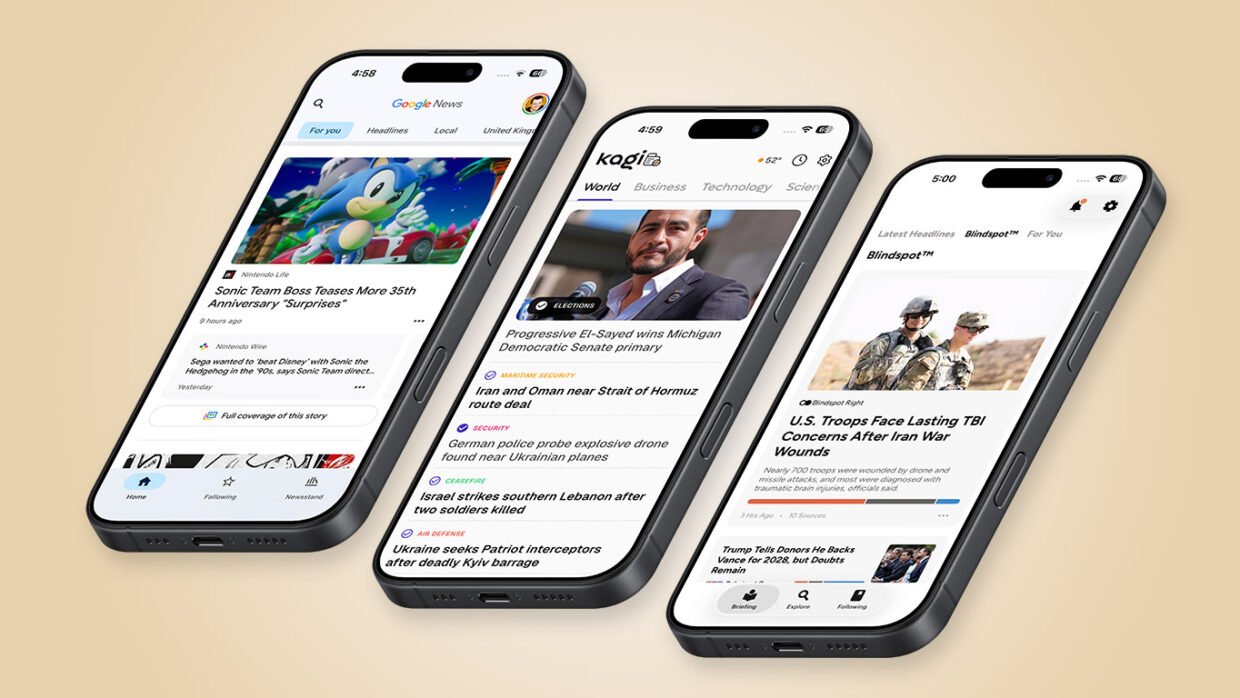
Google News is a simple way to stay on top of world and local events while still leaving room for different viewpoints. The “For you” tab curates stories based on your interests, while Headlines surfaces the day’s biggest stories. Crucially, every headline has a “Full coverage” button nearby, which lets you compare reporting from a wide range of outlets. The Headlines feed takes that a step further, letting you swipe between different takes on the same event.

The reading experience is less polished. Tap a headline and you’re sent to the original source website. It’s also worth noting that Google makes no judgments about any outlet’s political leaning. Instead, it gives you the tools to shape your feeds by showing more or fewer stories on a particular topic, and to follow or block specific publications.
A built-in reader view would make this a stronger recommendation, but Google News has a clean, no-nonsense approach to browsing headlines that makes it well worth a look.
Kagi News (free)

Kagi News feels refreshingly different from most news apps. Rather than encouraging you to keep checking in throughout the day, it provides a single daily digest that’s closer in spirit to a traditional newspaper.
You choose categories to follow, each of which appears as a tab you tap to access related headlines. Unlike Google News, Kagi News does not immediately send you to the source. Instead, it presents an algorithmically generated briefing that’s clearly laid out and typically includes key talking points, background information, timelines, and differing perspectives. Prominent links within the briefing then let you jump to original sources as you wish.

Thoughtful extras include World Tension, which attempts to quantify the current state of global affairs, and Today in History, which links to Wikipedia entries about events that happened on this day. Such features won’t suit everyone and Kagi News won’t always surface every story you care about. But I like its deliberate attempt to wrench you away from the 24/7 news cycle and encourage a more mindful daily catch-up instead.
Ground News (from free)

Ground News wants to help you cut through the noise and escape from your news bubble. Like Kagi News, it opens with a recap: The Last 24 condenses the biggest stories into a five-minute read, complete with key takeaways. Open a story and you’ll find an overview along with implications, timelines, and a breakdown of where sources agree and disagree. Where Ground News stands apart is in its willingness to analyze how the coverage itself may be biased.
Charts categorize reporting across the political spectrum, while summary pages group outlets by political leaning, ownership, and trustworthiness. Not every assessment will convince everyone – I found some of its classifications of well-known right-wing British outlets rather “generous” – but the broad approach is genuinely thought-provoking.

I also really liked the Blindspot feature, which highlights stories receiving little or no attention from one side of the political spectrum. It’s a good way to broaden your own perspective, although be aware that much of this deeper analysis sits behind a subscription. So make the most of the free trial before deciding whether to pay.
Other iPhone news apps to try
If comparing perspectives isn’t a priority, there are plenty of other news apps to try. RSS readers and media aggregation apps let you build personalized feeds, while Readly takes almost the opposite approach by giving you digital editions of national and local newspapers.

Among dedicated news apps, Apple News is slick and customizable, although constant prompts to subscribe to News+ can become tiresome. Flipboard is still going strong, with its distinctive flippy interface still feeling surprisingly fresh after all these years. But my final mention goes to inkl (depicted above). Like Apple News, it gives subscribers articles from a range of publishers, but its Good News section is devoted entirely to uplifting stories. Whatever you think of the app, that’s one headline we can all get behind.